

What is work management software?
Work management software is the backbone of modern business operations. It unifies project planning, task tracking, resource allocation, and reporting so teams, from PMOs and IT departments to small businesses and enterprises, can execute work efficiently. As companies enter 2026, hybrid and remote work models are the norm, making collaborative work management software essential. These platforms help connect distributed teams, automate workflows, and provide real-time insights. In fact, the global work management software market, valued at $6.5 billion in 2025, is projected to more than double by 2033. This surge is driven by remote work adoption, AI-driven automation, and demand for integrated task coordination. Whether you need a full-featured enterprise portfolio manager or a lightweight work order management solution, the right software keeps projects on track, people aligned, and morale high.
What is the Primary Purpose of Work Management Software?
At its core, a work management software platform brings order to business activities. It captures tasks, schedules, budgets, and approvals in one place so teams always know who’s doing what by when. Key functions include task assignment, Gantt or kanban-style planning, resource leveling, time tracking, and reporting. This “software for work management” replaces scattered spreadsheets and emails, offering a single system of record. For example, adding a resource in Celoxis instantly updates project costs and timelines. By automating these connections, work management tools ensure no detail falls through the cracks.
These systems also foster collaboration. Teams can comment on tasks, share files, and update status within the platform. In practice, a marketing team might use Asana to coordinate a product launch across departments, while an IT team could use Wrike to manage a software rollout with nested tasks and proofing. Hybrid work management software supports remote teams by providing cloud access, mobile apps, and real-time notifications. This means an engineer in San Francisco and a designer in Berlin see the same project dashboard and updates. By aligning work with company goals and metrics, the best work management software helps every employee understand their impact, which boosts accountability and confidence.
Must Check: Best Project Management Software for Engineering Teams
How Work Management Software Improves Morale
Surprisingly, better tooling leads to happier teams. When employees use intuitive, collaborative platforms, work becomes less stressful. Clear assignments and deadlines prevent confusion and help individuals manage their workload. For instance, seeing tasks laid out in a timeline or board view gives team members a sense of progress and achievement. Regular status dashboards and reports also recognize contributors’ efforts and highlight wins. Managers can identify bottlenecks before they cause frustration. By reducing email back-and-forth and manual status updates, team morale often improves: people focus on meaningful work, not chasing approvals or status updates.
Hybrid environments benefit especially. With hybrid work management software, remote workers feel connected through real-time collaboration features and transparent workflows. Knowing project updates are visible to all builds trust. Features like instant messaging, comment threads, and shared dashboards create a virtual “office,” supporting culture and empathy. In sum, by streamlining processes and communication, work management tools transform chaotic workdays into coordinated team efforts. This clarity and teamwork make people more engaged and satisfied with their jobs.
List of Top 5 Work Management Software

Celoxis is an all-in-one AI work management platform designed for complex, enterprise-level projects. Unlike many siloed tools, Celoxis includes scheduling (Gantt charts), resource management, timesheets, billing, risk and issue tracking, and robust reporting, all built in. As one guide notes, “Celoxis has everything built-in: scheduling, resources, timesheets, billing, risks, reporting, and more. All working together seamlessly”. There are no fragile plugins or disconnected add-ons; the system automatically synchronizes changes across projects. For example, assigning a new engineer to a task in Celoxis instantly recalculates budgets and effort across the portfolio. This handles real-world complexity out of the box, without messy workarounds.
Also Read: Project Management Information System: A Complete Guide
- Key Features: Gantt scheduling, kanban boards, portfolio views; resource planning and leveling; time & expense tracking; budgets and costing; risk/issues management; advanced dashboards & BI reporting; and a customizable client portal.
- Use Cases: Celoxis shines for PMOs and IT departments managing large portfolios of projects. Construction, engineering, and professional services use it to tie tasks to financials and timelines. Marketing or product teams benefit from its flexible workflows and approvals.
- Remote/Hybrid Support: Available as a cloud SaaS or on-premise solution, Celoxis works in global environments. It has a mobile-responsive interface and integrates with Slack, Teams, Outlook, and more. Multi-currency and global calendar support enable seamless hybrid work.
- Differentiators: As its brand positioning highlights, Celoxis offers BI-grade reports that executives trust. Leaders can build board-level dashboards without consultants, directly from live data. The software scales effortlessly – whether managing 10 projects or 10,000, Celoxis “stays fast and reliable”. Yet it remains user-friendly. It’s “strong enough for PMOs managing complex portfolios, but still simple and intuitive for team members to adopt quickly”. Crucially, Celoxis provides human support and a zero-stress trial, guiding customers from day one. And its pricing is predictable and frugal – enterprise-grade features without runaway costs.
Celoxis for Enterprise and Mission-Critical Projects
For large enterprises and mission-critical initiatives, reliability and power are paramount. Celoxis positions itself as an “enterprise-grade” PMO solution and even aspires to be “the SAP of project management” – a global gold standard for mission-critical execution. Unlike SAP’s heavyweight bureaucracy, Celoxis delivers comparable power with speed and elegance. In practice, this means:
- Trusted Execution: Celoxis is built for environments where failure isn’t an option. It handles complex, regulated processes (intake approvals, risks, compliance) out of the box, providing end-to-end visibility. Leaders can run executive reviews directly off live Celoxis dashboards, trusting the data without manual reconciliation.
- Scalability & Performance: The platform’s architecture scales seamlessly. Companies that outgrew other tools on the order of hundreds of projects often switch to Celoxis to manage thousands. As the brand doc notes, “Celoxis stays fast and reliable whether you’re managing 10 projects or 10,000”.
- Mission-Critical Resilience: Celoxis’s roadmap envisions being “admired for delivering the same enterprise-grade power with speed, efficiency, and elegance, without the bloat” of legacy systems. In other words, it aims to give enterprises the trust and capability of legacy PM tools (like SAP PPM) while being lightweight and cost-effective.
- Support & Governance: Large teams and organizations also value Celoxis’s high-touch support and governance features. Its human specialists help customize workflows and ensure best practices. Meanwhile, robust permission controls and compliance features (SOC2, ISO, etc.) meet enterprise security needs.
In summary, Celoxis’s all-in-one design, combined with predictable pricing and dedicated support, makes it well-suited for PMOs, IT departments, and large enterprises. It avoids the tool fragmentation that plagues many organizations, offering a single, unified workspace for projects and resources.
Benefits: Teams using Celoxis gain real-time visibility into projects and resources across the organization. Managers save hours on manual reporting and reconciliation, since timesheet approvals instantly roll up to project costs. Remote and hybrid teams stay aligned via shared dashboards and automated notifications. All stakeholders – from workers to executives – use the same live system, reducing email and siloed spreadsheets.
2. ProofHub – All-in-One Project Management and Team Collaboration

ProofHub is an all-in-one project management and team collaboration platform that helps teams plan projects, manage tasks, collaborate, and track progress from a single centralized platform. Instead of switching between separate tools for project planning, communication, file sharing, and reporting, teams can bring their day-to-day work together in one place. This makes it easier to know what needs to be done, who is responsible, and how the project is progressing.
- Key Features: Project planning and task management; Kanban boards; Gantt charts; calendars; timesheets; discussions and chats; file sharing; custom workflows; reports; and project templates. Teams can organize work, communicate around projects, and keep important project information accessible from one workspace.
- Use Cases: ProofHub works well for all types of teams, including marketing, creative, software, professional services, and cross-functional teams, managing multiple projects. Marketing teams can plan campaigns and content calendars, creative teams can manage reviews and approvals, while project managers can use Gantt charts, reports, and workload visibility to keep projects moving.
- Remote/Hybrid Support: ProofHub gives distributed teams a shared space to manage tasks, communicate, share files, and follow project updates. Instead of relying on scattered conversations and status updates, teams can keep project-related information connected to the work itself.
- Pricing: ProofHub uses a flat-rate model, so teams can add users without paying per additional seat. This can make costs easier to predict as the team grows.
- Strengths & Limitations: ProofHub’s biggest strength is bringing project management and team collaboration together without requiring multiple tools. Its centralized workspace helps teams reduce tool switching and maintain better visibility across projects. Teams looking for highly specialized enterprise resource planning or advanced financial management may need a more specialized platform.
Example: A marketing team can use ProofHub to plan a campaign, assign tasks, set deadlines, collaborate on files, discuss project updates, and monitor progress from the same workspace. Project managers can use reports and project views to quickly understand what is on track and where attention is needed.
3. Asana – Collaborative Work Management Platform

Asana is a popular collaborative work management software known for its ease of use and scale. Branded as “the only work management platform built for scale,” Asana helps teams set company-wide goals and track projects in one place. In practice, Asana lets you create tasks, subtasks, and sections, assign work to individuals, and view everything in a kanban board, list, timeline, or calendar. Its AI-powered automations (Asana AI) can automate routine tasks, set due dates, and even generate project outlines. Importantly, 85% of Fortune 100 companies use Asana, showing its enterprise chops.
- Key Features: Task lists; Kanban boards; Timeline (Gantt-style) view; Portfolio dashboards; Goal-setting and tracking; workflow automations; forms for intake; and extensive app integrations. Asana also offers advanced features like approvals and proofing in higher tiers.
- Use Cases: Asana works well for cross-functional projects and creative workflows. Marketing agencies, design teams, and product launches use it to manage campaigns and content calendars. IT and operations teams use it for incident tracking and rollout plans. Its visual interface and goal alignment features suit companies keen on connecting daily tasks to high-level objectives.
- Remote/Hybrid Support: Asana is cloud-native with a mobile app, so distributed teams can access updates anywhere. It integrates with communication tools (Slack, Teams) and cloud storage (Google Drive, Dropbox) to unite remote workflows. Asana’s Universal Reporting lets any stakeholder see progress in real time, a big plus for hybrid teams.
- Pricing: Asana offers a free plan for up to 2 users, making it an example of “free project and work management software” for individuals or small teams. Paid plans are tiered: Starter ($10.99/user/mo) for basic project needs, and Advanced (~$24.99/user/mo) for portfolios, custom rules, and advanced timelines. An Enterprise tier adds security and support. Its generous free tier and clear pricing make Asana accessible for growing teams.
- Strengths & Limitations: Asana’s intuitive interface and extensive templates reduce onboarding time. Users can automate and scale work without coding. However, pure Asana focuses on task and workflow management; financial features (like billing or detailed costing) are limited. Some teams find that Asana’s deep customization leads to a learning curve, and higher-tier plans are needed for advanced analytics.
Example: A marketing department might use Asana to collect project requests via forms, move tasks through an approval workflow, and display campaign timelines on a shared dashboard. Meanwhile, executives can use Asana’s Goals feature (in the Advanced plan) to align projects with company targets.
You may also check:
- Basecamp vs Trello vs Asana vs Celoxis: 2026 Comparison
- Top 7 Web-based Project Management Software for Agile Teams
4. Wrike – Flexible Enterprise Project Management
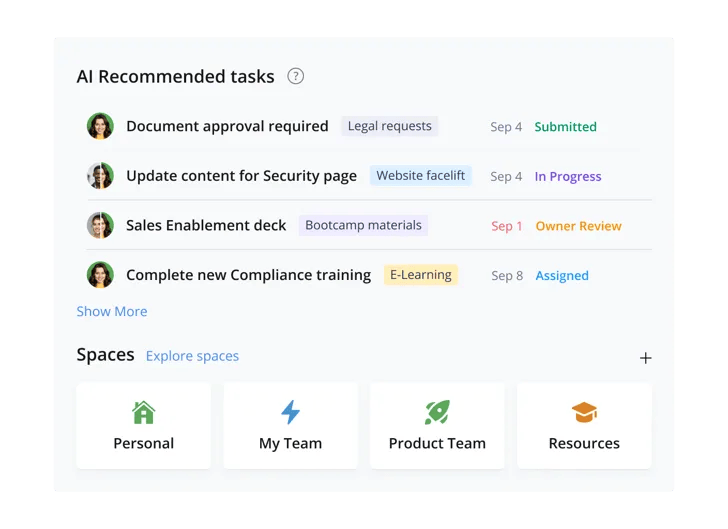
Wrike is a flexible work management software popular in marketing, creative, and IT environments. It offers a range of project views (Gantt charts, boards, table/grid) and strong workflow customization. According to one expert review, “Wrike delivers a top-tier onboarding experience and intuitive interface” that makes it easy to adopt even as an enterprise-grade tool. Notably, Wrike includes AI-powered features in every plan at no extra cost, helping teams automate tasks, generate reports, and predict project outcomes. It also has a unique proofing and collaboration feature for visual content, allowing creative teams to comment on and approve designs directly in the platform.
- Key Features: Custom workflows and fields; dynamic request forms; Gantt and Kanban views; built-in proofing and live annotation; time tracking; resource and workload management; robust reporting and dashboards; and integrations with tools like Salesforce, Google Workspace, and Adobe.
- Use Cases: Wrike excels for mid-size to large teams handling multiple projects, especially in marketing/creative agencies or IT. For example, an advertising team can use Wrike’s proofing tools to speed up design approvals, while an engineering team might use its structured task management and reporting. IT departments use Wrike’s collaborative portals for ticketing and knowledge sharing.
- Remote/Hybrid Support: Wrike is cloud-based with good mobile apps. It supports real-time collaboration so remote users see live updates. It offers features like 2FA (in higher plans) and SSO for security across distributed teams. Dashboard sharing and @mentions keep everyone on the same page.
- Pricing: Wrike has a free plan for small teams, and paid tiers starting around $10/user/month (billed annually). Its Enterprise plan unlocks advanced security and administration controls. For organizations, Wrike’s pay-as-you-go flexibility is useful, though some advanced integrations incur extra fees.
- Strengths & Limitations: Wrike’s powerful customization means it can adapt to many processes. Its proofing tool is a standout for design-heavy workflows. The interface is generally praised as user-friendly. Downsides: the wealth of features can be overwhelming for new users, and certain integrations require additional costs. Some reviews note that locating where certain data (like form responses) is stored can be confusing.
Example: A software team might use Wrike’s AI-driven work intelligence to automate status updates and prioritize backlog items. A creative agency might rely on Wrike’s proofing to compare image versions. As one review summarizes, “Wrike’s proofing feature helps you streamline creative approval processes. Wrike’s AI features, included in all plans, enhance productivity”.
5. Monday.com – Visual Work & Collaboration Platform

Monday.com is a visual work management platform known for its ease of use and flexibility. It presents tasks in colorful, customizable boards and timelines, making project status instantly clear. Users can create forms, dashboards, and even documents within Monday. According to reviews, Monday’s “standout features… integrations and automations set it apart”. Its interface is highly intuitive, and drag-and-drop boards and simple timeline edits make planning straightforward. Monday also offers a wide array of templates for common use cases (CRM, marketing campaigns, event planning, etc.), plus hundreds of app integrations.
- Key Features: Customizable boards and columns; multiple views (Kanban, calendar, map, workload, etc.); native integrations (Zoom, Dropbox, Gmail, etc.); workflow automations (alerts, status changes); collaborative docs; and basic time tracking.
- Use Cases: Monday.com works well for teams that thrive on visual organization. Marketing and event teams use it to track campaigns and schedules. Operations and HR use it for recruiting pipelines and task checklists. Remote teams benefit from its real-time updates and simple communication features. Its flexibility means it can adapt to almost any departmental process.
- Remote/Hybrid Support: As a cloud platform, Monday supports distributed teams with live updates and guest access for clients. It has robust mobile apps and integration with video conferencing tools. For “hybrid work management software,” Monday’s dashboards allow any team member, remote or in-office, to see project status at a glance.
- Pricing: Monday offers a free plan (up to 2 seats) and paid tiers starting at $9/user/month (billed annually). Paid plans unlock advanced views, automations, and reporting. The platform often bundles features (e.g. “Basic,” “Standard,” “Pro” plans) with increasing limits on automations and integrations.
- Strengths & Limitations: Monday is praised for its clean interface and ease of onboarding. Pros include an easy-to-use drag-and-drop UI and extensive integrations. Users can even create forms embedded in boards. However, reviews note a learning curve exists for powerful customizations, and some basic features (like recurring tasks) require higher-tier plans. Additionally, its Gantt (Timeline) view is less sophisticated than dedicated project tools. Overall, Monday.com is ideal for teams that need a highly visual, collaborative workspace rather than complex portfolio management.
Example: A startup’s product team might use Monday’s Kanban boards to plan sprints and its automation feature to move tasks forward when completed. A creative studio could use Monday’s proofing and file-sharing to gather feedback on designs. Its “highly visual and customizable” nature makes tracking multi-faceted projects easy, though teams needing heavy analytics may supplement Monday with other tools.
6. Jira Work Management – Atlassian’s Business Collaboration

Atlassian’s Jira Work Management (JWM) is the business-focused counterpart to Jira Software (the developer tool). It brings Atlassian’s workflow engine to teams like HR, marketing, finance, and operations. Think of it as a project tracker for non-technical teams, with views like list (spreadsheet), board, calendar, timeline, and unique summary dashboards. As one source explains, “Jira Work Management and Jira Software are almost the same, but differ in some notable ways,” tailored to different users. In JWM, tasks are called “items,” and projects can use colorful templates out of the box. A distinctive feature is synchronous collaboration mode – multiple users can edit the same item simultaneously, a first for Jira products.
- Key Features: Project templates for business teams; list (table) view with inline editing; calendar and timeline; Kanban board; built-in forms for requests; advanced reporting (status-focused); and tight integration with other Atlassian tools (Confluence, Jira Service, etc.).
- Use Cases: Jira Work Management suits organizations already using Atlassian products. For example, a legal team might use JWM to manage contract approvals with custom workflows. Finance teams use it for budget requests. DevOps teams might leverage it alongside Jira Software to track non-coding tasks or internal projects. Essentially, any “work management” need in an enterprise that wants one joint ecosystem.
- Remote/Hybrid Support: JWM is cloud-based (also available on-prem under Atlassian data centers). It offers real-time synchronization across projects. Since Jira’s Cloud supports mobile devices and multi-region data residency, it fits global teams. Integrated chat and Rovo AI search enhance collaboration in distributed settings.
- Pricing: Atlassian offers a free plan for up to 10 users with core features and 2 GB storage. Paid plans start at about $8/user/month (Standard) and $15+/user/month (Premium). Higher tiers add automation rules, advanced permissions, and unlimited storage. The flexibility of Atlassian’s cloud makes it scalable for organizations of any size.
- Strengths & Limitations: Strengths include deep configurability and robust permission controls. JWM inherits Jira’s power (issues, dependencies) without requiring coding knowledge. For companies with many legacy Jira users, it offers synergy; tasks can move between JWM and Jira Software projects seamlessly. Limitations are typical of Atlassian products: there is a setup and learning curve, and some find the UI less intuitive than simpler tools. JWM focuses on process rather than simplicity, so small teams might find it heavier than needed.
Comparison Note: Some teams wonder, Jira Work Management vs Jira Software? The key is audience: JWM is built for business teams (marketing, HR, operations) with friendly views like lists and calendars, whereas Jira Software is built for software development with advanced agile boards and code integrations. Both share the same backend, so issues/items can cross between them.
Comparison Table
| Software | Primary Use Case | Pricing Model | Remote Work Support | Scalability |
|---|---|---|---|---|
| Celoxis | Complex projects, PMOs, portfolio mgmt | SaaS ($10–$25/user/mo) or on-prem | Cloud/On-Premise; mobile; integrations | Enterprise-grade (10–10,000+ projects) |
| Asana | Cross-team tasks and agile workflows | Freemium ($0, $11, $25+/user/mo) | Cloud, real-time updates, integrations | Small to large teams (used by 85% F100) |
| Wrike | Marketing, creative, IT projects | Freemium (free, $10+/user/mo) | Cloud, dashboards, collaboration | Scales to enterprise; AI in all plans |
| Monday.com | Flexible workflows (marketing, HR, ops) | Freemium (free, $9+/user/mo) | Cloud, real-time collab, mobile apps | SMB to enterprise; customizable |
| Jira Work Management | Business teams, HR, Finance, DevOps | Freemium ($0–$15+/user/mo) | Cloud/Server, Jira & Confluence | Enterprise-ready (up to 100k users/site) |
Each option above addresses different needs. For example, Celoxis’s cloud plan emphasizes analytics and custom dashboards, while Wrike and Monday offer free tiers for small teams. All support remote collaboration, though their strengths vary: Celoxis and Jira handle complex portfolios at scale, whereas Asana and Monday excel at team visibility and ease-of-use.
Best Collaborative Work Management Tools Compared (2026)
Collaboration is often where work management software is put to the true test. It is one thing to assign a task; it is another for a distributed team, external clients, and leadership to all see the same live picture without duplicate updates or version confusion. Below is a focused comparison of the same five tools, this time scored specifically on real-time collaboration, communication, and visibility features that matter most for hybrid project management teams.
| Tool | Real-Time Updates | Shared Dashboards |
|---|---|---|
| Celoxis | Yes, across projects and portfolios | Live BI-grade dashboards for teams and clients |
| Asana | Yes, task and project level | Portfolio dashboards |
| Wrike | Yes, with live notifications | Custom dashboards and reports |
| Monday.com | Yes, board level | Visual boards, limited BI depth |
| Jira Work Management | Yes, synchronous editing on items | Status-focused dashboards |
Where each tool stands out for collaboration:
- Celoxis is the strongest choice when collaboration needs to extend beyond the internal team. Its client portal lets external stakeholders view progress and share files without needing a full license, while the same live dashboards used internally can be shared with clients or executives, no reformatting or exporting required. This makes it a strong fit for PMOs and enterprises coordinating collaboration across many projects and teams at once, not just within a single board or workspace.
- Wrike leads on creative collaboration specifically. Its built-in proofing and live annotation tools make it the go-to for design and marketing teams that need visual feedback loops, something Celoxis, Asana, and Monday do not match natively.
- Asana is well suited for cross-functional teams that live in comments and mentions to keep work moving, particularly for marketing and creative workflows where tasks move fast across departments.
- Monday.com wins on visual clarity. Teams that want collaboration to feel intuitive and colorful, without a steep learning curve, tend to gravitate here, though its dashboards are lighter on analytical depth compared to Celoxis.
- Jira Work Management offers synchronous, multi-user editing on items, a genuine differentiator, but its collaboration features are strongest for teams already inside the Atlassian ecosystem rather than organizations needing to loop in external clients or non-technical stakeholders.
What to Look for in Work Management Software
When evaluating work management software, focus on these criteria:
- Unified Functionality: The tool should consolidate project plans, tasks, timesheets, resource bookings, and reports in one platform. Avoid solutions that require piecing together separate apps – you want a single source of truth.
- Scalability: Check that the system stays responsive as your number of projects and users grows. It should handle large portfolios and data volumes without slowing down.
- Ease of Use: Look for an intuitive interface and strong onboarding support. Software that is easy to learn will see faster adoption. Consider free trials or demos to gauge how quickly your team can get productive.
- Collaboration & Integration: Ensure the platform supports real-time collaboration (comments, file sharing, notifications) across teams and integrates with your existing tools (email, chat, file storage). Seamless integration with popular apps (Slack, Google Workspace, Jira, etc.) creates a streamlined workflow.
- Reporting & Analytics: Good work management software provides customizable dashboards and live reports so managers can track progress and identify bottlenecks. Executive-grade analytics (pie charts, burn-ups, capacity heatmaps) are valuable for data-driven decisions.
Pricing & Support: Consider the cost model – per-user pricing, free tiers, or enterprise packages. Transparent, frugal pricing (like Celoxis’s) helps control costs. Also, look for vendors that offer responsive human support (not just automated help) to ensure long-term success.
How to Choose the Right Tool
Choosing the best work management tool depends on your team’s specific needs:
- Assess Your Processes: List the workflows and project types your team handles. Do you need agile boards, Gantt charts, resource leveling, or invoice integration? Match these against each tool’s strengths.
- Define Team Size and Roles: Small startups may prioritize ease and cost (free plans), whereas large PMOs need enterprise governance and scalability. Make sure the pricing and licensing model (e.g., unlimited guests, role-based licenses) fit your organization.
- Test with a Pilot: Wherever possible, run a trial or proof-of-concept. Let a cross-section of users test key tasks in the software. Gather feedback on usability, performance, and missing features.
- Consider Integrations & Ecosystem: Check if the software connects with tools you already use (CRM, development, finance, etc.). A broad integration ecosystem means less manual data entry and better adoption.
- Read Reviews & References: Look at analyst reports and user reviews for real-world pros and cons. For example, independent reviews highlight Wrike’s strength in creative proofing and Asana’s ease of use, whereas Celoxis is noted for avoiding tool fragmentation and its trusted, robust feature set.
Vendor Viability: Ensure the vendor has a solid track record. A mature company with steady development (like Celoxis or Smartsheet) is less likely to abandon key features or spike prices.
Why Celoxis Is the Best Solution for Work Management
Celoxis stands out because it was built from day one as a strategic, enterprise-grade platform, not just a basic task app. Key reasons Celoxis excels:
- True All-in-One: Celoxis combines scheduling, resource/capacity planning, time tracking, billing, risk management, and rich reporting in a single platform. This eliminates data silos and costly integrations with third-party tools. All processes update each other seamlessly (e.g., adding a resource auto-adjusts budgets).
- Mission-Critical Reliability: It’s engineered for complexity. Celoxis aims to be “the SAP of project management” – a trusted global standard for mission-critical execution – but without SAP’s bloat and cost. This means it delivers enterprise power (scalability, security, compliance) with agility and elegance.
- Predictable Value: With straight-per-user pricing and no surprise fees for automations or add-ons, Celoxis offers a high ROI. Large organizations appreciate that licensing grows linearly; they won’t get hit with hidden costs as usage expands.
- Hands-On Support: Unlike many SaaS vendors, Celoxis provides real expert support during trials and after purchase. This personal assistance helps teams configure the tool to their needs and accelerates adoption.
Proven Success: Celoxis is already trusted by hundreds of global brands across industries (from manufacturing to finance). Its architecture has been battle-tested on thousands of concurrent users and projects. In short, Celoxis offers an unmatched combination of enterprise features, scalability, and value, making it a top choice for work management software.
Conclusion
Work management software has become essential for organizations of all sizes to plan, track, and execute work efficiently, especially in remote or hybrid environments. The right tool centralizes tasks, schedules, and communication so that teams stay aligned and leaders can make decisions confidently. In our overview of leading solutions, each platform has its niche – from Wrike’s collaboration prowess to Asana’s simplicity, ClickUp and Smartsheet flexibility & grid-based governance. However, Celoxis uniquely combines broad functionality with enterprise performance and fair pricing. As shown above, Celoxis avoids the pitfalls of fragmented tools and delivers a reliable backbone for mission-critical projects. When choosing a work management solution, consider your specific needs and team dynamics. But for organizations seeking a trusted, all-in-one system, Celoxis stands out as the most comprehensive and future-proof option.
You may also look:


Comments
0 responses